Hello,
Do you have a simple example of how one can programmatically extend the model?
My model currently has part definitions and I would like to add their corresponding requirements to the model:
- I could generate .sysml files via a template but is there a way to create elements in the model using the SysIDE python API?
- How do associate the created requirement elements with the existing part definitions in the model?
Thanks!
Tom
Hi,
For namespace body elements you would use .children, e.g. creating a new owned attribute
membership, attribute = part.children.append(syside.FeatureMembership, syside.AttributeUsage)
# modify `attribute` as needed
For references, you would need to pass an existing element
membership, attribute = part.children.append(syside.Membership, attribute)
Generally, there are 3 common cases:
.append(<owning membership type>, <child type>) will create empty membership and child elements.append(<owning membership type>, child) will create an empty membership and take ownership of child.append(<relationship type>, element) will create an empty non-owning relationship with a reference to element
Relationships are currently only allowed to be constructed automatically as they rarely need to be modified. With dependent generics, this also catches related element type mistmatches statically (sadly, not supported by Python).
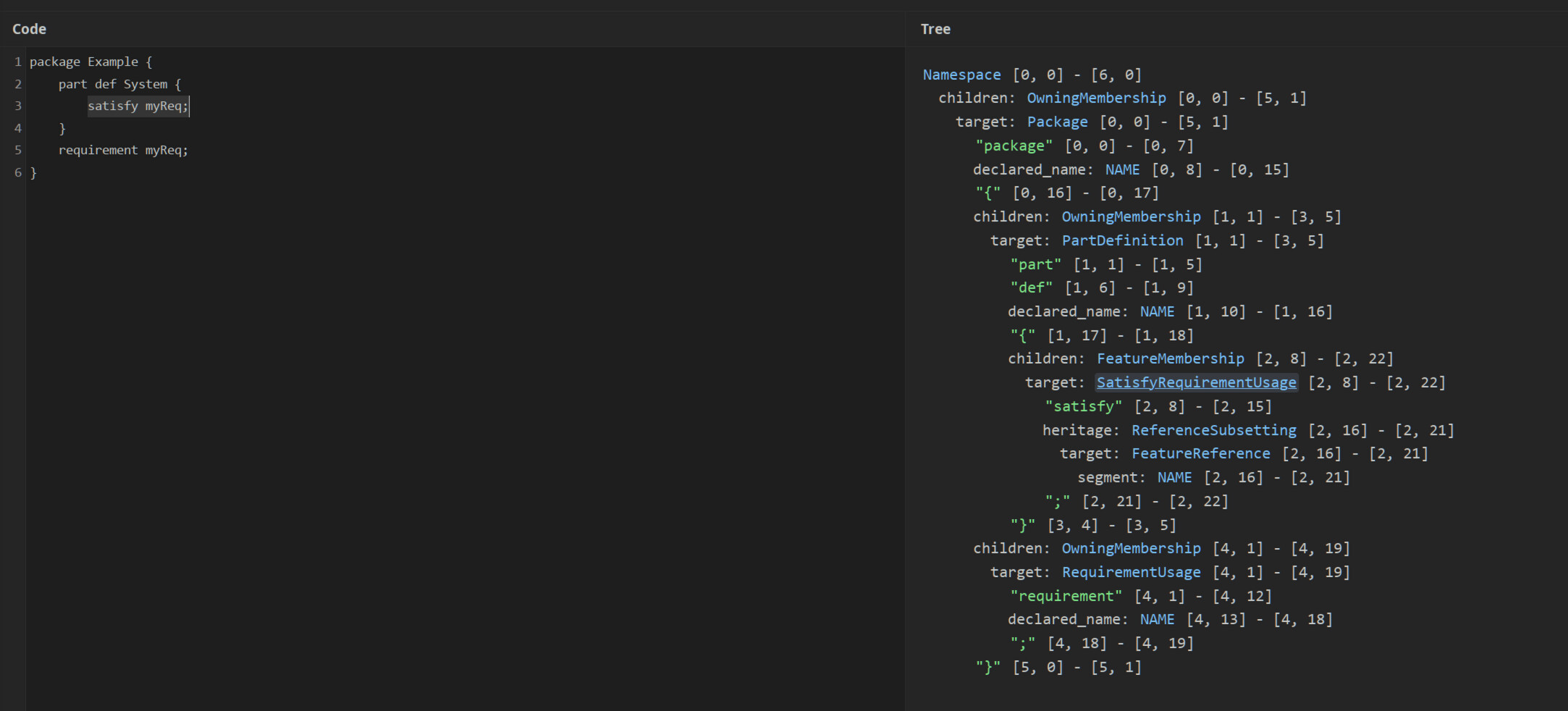
cst.syside.app has recently been updated to match field names with the API, e.g.
(Note general purpose target and source fields, these will be automatically updated with a given element on construction, e.g. using .append).
Common accessors for modifying the model include:
All mutable accessors are children of ChildrenNodes (multiple) and MemberAccessor (single). See Used in at the bottom of each type page for places where they are used.
These are distinct types to improve static type checking and type inference because Python does not support generics of higher-kind.
Thanks for your reply! I’m trying to apply it to a concrete example, but I’m having some difficulty.
For the following model example I have a python script that extracts the System and myReq elements.
package Example {
	part def System;
	requirement myReq;
}
Now I would like to programmatically modify the model (i.e. the .sysml files) to look like this:
package Example {
	part def System {
        satisfy myReq;
    }
	requirement myReq;
}
What would the python script look like?
Thanks!
You need to replicate the structure as it would appear in text, e.g.
_, satisfy = system.children.append(syside.FeatureMembership, syside.SatisfyRequirementUsage)
_ = satisfy.heritage.append(sysisde.ReferenceSubsetting, my_req)
Thank you! I think I understand the steps now!
I was also missing the steps before and after, but I found some useful snippets in the examples. Here’s my working example:
import syside

def get_element_by_type(model: syside.Model, type: str) -> list[syside.Element]:
    """Return a list of elements from the model that have the given type (e.g. "AttributeUsage", "PartDefinition", etc.)."""

    elements = []
    for element in model.elements(syside.Element, include_subtypes=True):
        if element.cst_node is not None:
            if element.cst_node.type == type:
                elements.append(element)

    return elements


SRC = """\
package ExtendModelExample {
	part def System;
	requirement myReq;
}
"""


# Load model
model, _ = syside.load_model(sysml_source=SRC)
model_document = model.user_docs[0]

with model_document.lock() as doc:
    root = doc.root_node

    # Get elements from model
    part_defs = get_element_by_type(model, "PartDefinition")
    system = part_defs[0]
    req_usages = get_element_by_type(model, "RequirementUsage")
    my_req = req_usages[0]

    # Add satisfy relationship
    _, satisfy = system.children.append(syside.FeatureMembership, syside.SatisfyRequirementUsage)
    _ = satisfy.heritage.append(syside.ReferenceSubsetting, my_req)

    # Update model
    printer_cfg = syside.PrinterConfig(line_width=80, tab_width=4)
    printer = syside.ModelPrinter.sysml()
    sysml_text = syside.pprint(root, printer, printer_cfg)

    with open("ExtendModelExample.sysml", "w", encoding="utf-8") as fp:
        fp.write(sysml_text)
get_element_by_type can be improved
def get_element_by_type[T: syside.Element](model: syside.Model, type: type[T]) -> list[T]:
    return list(model.elements(type, include_subtypes=True)
This is both more concise and propagates the element types to the type system for IDE support, e.g. auto-completion.